ID and Class in HTML: What’s the difference?

A lot of beginners struggle with the difference between class and ID in HTML. Both are used to identify HTML elements, and both are often used to apply styling, but there are a few key differences.
Simply put, the rule of thumb is this:
ID is unique, only applied once per page, and is used to highlight an individual element.
Class is applied to multiple objects as many times as you want, and is used to style elements which you want to have look similar or follow similar rules.
A closer look at ID: identifying individual elements
Do you want someone else to have your ID? No! It’s yours! You are a unique individual, and even if you have an identical twin who is genetically the same as you, your ID still belongs to you. Similarly, in HTML we use ID to specify an element which is unique or only occurs once on the page. This is helpful not only for styling individual elements, but it becomes extremely important once you start integrating JavaScript, because it allows you to quickly and easily interact with specific page elements.
A closer look at Class: classifying multiple elements
Ever heard of a class-action lawsuit? It’s when multiple people bind together to sue someone because they’re all affected by something. Similarly, in HTML we use class to bind together multiple elements so they can all benefit from our styling in the same way.
If you were to apply ‘class’ to individual elements, and then later try to work with those elements in JavaScript, you will have to access them in a completely different (and less direct) way which can be a real pain especially when you first start using DOM manipulation.
An example: ID vs Class
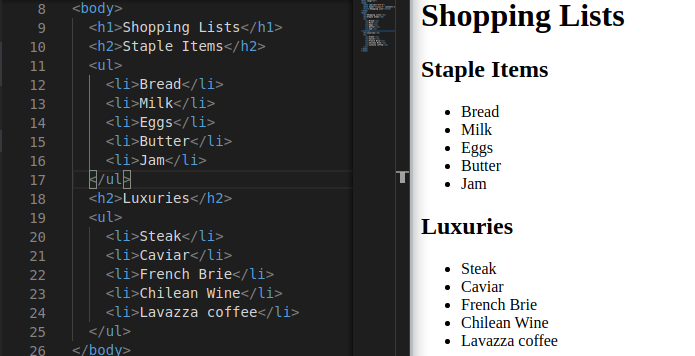
Let’s have a look at a quick example. Let’s say I have two lists of items to buy at the supermarket: things I know I can afford, and things which are luxuries which I’ll order if I have the money that week.
The HTML and result of these lists could look something like this, without styling:
Now let’s say that I want to give my two list headings different fonts: ‘Staple Items’ will look basic and use Arial, while ‘Luxuries’ will look a bit nicer with a custom Google font called ‘Satisfy’. I’m also having a party on Saturday, so there are some items which are really important, regardless of their cost, and I want those items to be coloured red so that I don’t forget to buy them: milk, butter, brie, and wine. Based on this information, take a moment and think about which elements should be given an ID, and which should be given a class.
We simply ask ourselves if the changes we’re making apply to one item, or to many.
Our fonts are going to apply to individual headers, so we should give them each an ID. Meanwhile, our important items will be marked with a class called ‘important’, because we have four items which all need the same styling. In the end, this is what we end up with:
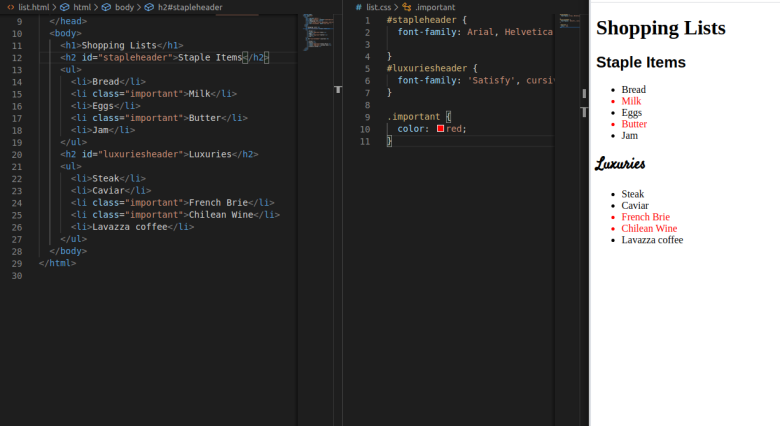
It might not be pretty, but it proves our point!
Quick quiz!
You want to apply a style to each of these elements. Which of these would take ID, and which Class?
- The main title of your page
- The subheadings on a blog post
- All input fields in a form
- The submit button for a form
- A picture of your grandmother
- Photos in a photo gallery
- Delete buttons on a todo list
Comments
Join the discussionThis is amazing, thanks for sharing!